Send your invoices, receipts, or statements to free@invoicepilot.biz and get back a clean Excel report — no account, no software, no waiting.
| # | Vendor | Invoice # | Date | Amount | ✓ |
|---|---|---|---|---|---|
| 1 | Office Depot | INV-0891 | Oct 3 | $247.50 | p.1 |
| 2 | AWS | 1234-5678 | Oct 1 | $1,023.14 | p.1 |
| 3 | FedEx | 7734-0192 | Oct 7 | $38.90 | p.2 |
| Total | $1,573.44 | ||||
"I forwarded a stack of October invoices, put 'invoice' in the subject, and had a clean AP list in my inbox 10 minutes later. What used to take me an afternoon is done before my morning coffee."
— Bookkeeper, small accounting practice
"My client emails me their receipts every month. I forward the whole batch to free@invoicepilot.biz with 'receipt' in the subject and get a formatted expense report back in minutes. No copying, no typing."
— Virtual assistant, managing 4 clients
"I used to spend an hour every quarter sorting receipts for my accountant. Now I attach them, type 'receipt' in the subject, and send. The spreadsheet comes back before I close my laptop."
— Independent consultant
Three steps. Your part takes under a minute.
Attach invoices, receipts, or statements (PDF, JPG, PNG, TIFF) — or paste a Google Drive, Box, or OneDrive share link in the email body. Any language, any layout.
Address the email to free@invoicepilot.biz. Put the template keyword in the Subject line — invoice, receipt, or statement. Leave the subject blank and we default to invoice processing.
An Excel report and curated evidence PDF arrive in your inbox automatically — usually within minutes. No credit card needed.
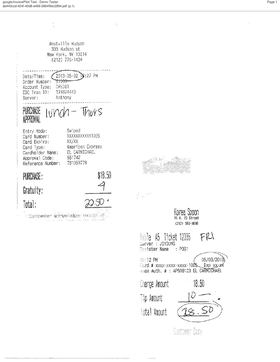
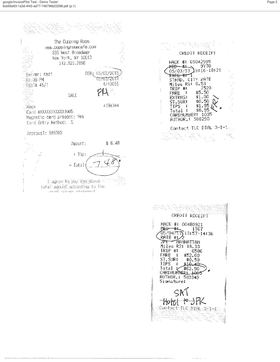
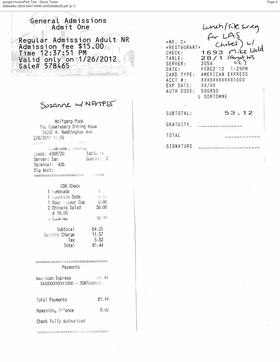
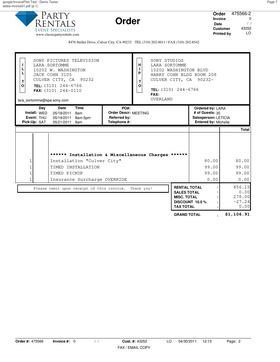
Real output from a real set of mixed expense receipts. 30 records across 10 source pages — processed automatically.
Your automated expense report is attached.
| # | Date | Vendor | Category | Amount | Payment | Memo | Source |
|---|---|---|---|---|---|---|---|
| 1 | 05/02/2013 | Westville Hudson | Meals | $22.50 | Amex | Lunch – Thurs | p.1 |
| 2 | 05/03/2013 | Taxi (Hack #05042985) | Transport | $8.95 | Credit | Fri | p.2 |
| 3 | 05/04/2013 | Taxi (Hack #00480921) | Transport | $62.90 | Credit | Sat – Hotel to JFK | p.2 |
| 4 | 02/08/2012 | Wolfgang Puck | Meals | $81.44 | Amex | Suzanne w/ NATPE | p.4 |
| 5 | 01/26/2012 | Vizcaya Museum | Entertain | $15.00 | Amex | Museum admission | p.10 |
| 6 | 04/30/2011 | Classic Party Rentals | Other | $1,106.91 | Credit | GCC Meeting 2011 | p.7 |
| … 24 more rows · full report in the attached Excel file | |||||||
2 receipts
3 receipts
3 receipts
1 invoice
This is real output from a real set of receipts — not a mockup. Try it with your own documents →
Put the template keyword in the Subject line — InvoicePilot picks the right extraction model automatically.
Paid users can also customize extraction to pull any fields from any document type.
Free tier accepts any sender. Just send the email — InvoicePilot replies with your report. No registration, no password, no onboarding screen.
InvoicePilot reads your attachments, identifies the relevant pages, and extracts every vendor, amount, date, and reference number — no manual steps.
Works with documents in any language and any visual layout — structured, scanned, handwritten, or mixed. PDFs, JPG, PNG, TIFF.
Two files every time: a clean Excel spreadsheet and a curated PDF of every source page — making spot-checks and audit evidence effortless.
Paste a Google Drive, Box, or OneDrive share link in the email body — InvoicePilot downloads the files and processes them alongside your attachments. Folders supported too.
Forward client documents, get Excel back, review and deliver. Paid plan adds a personal address per client.
Monthly invoices and receipts pile up in your inbox. Forward them, get a clean report back in minutes — no software, no data entry.
Forward your receipts and statements at quarter-end. Get a clean expense report back — hand your accountant a spreadsheet, not a pile of PDFs.
Personal address per client. Multi-template subjects extract invoices and receipts in one email. Reseller pricing available.
PDF (native and scanned), JPG, PNG, TIFF, WebP, HEIC, and HEIF. Attach them directly to the email. Free tier: up to 10 files, 2 MB total. Paid tier: up to 20 files, 10 MB total.
Your attachments are processed on encrypted AWS infrastructure and deleted immediately after the reply is sent. They are never stored beyond processing and are never used for any purpose other than producing your report. All transfers use HTTPS/TLS.
InvoicePilot flags unclear pages and notes them in the report so you can verify before submitting to your accountant. The evidence PDF includes the original source pages so you can cross-check any entry.
Attach your documents (PDF, JPG, PNG) to an email and send to free@invoicepilot.biz. Put the template keyword in the Subject line — invoice, receipt, or statement. Leave the subject blank and it defaults to invoice processing. No registration, no credit card.
Yes. We offer reseller pricing for agencies and bookkeeping firms that process documents on behalf of clients. White-label is also available — run InvoicePilot under your own domain and branding, with your clients never seeing ours. Contact pf@auriq.com with "reseller" or "white-label" in the subject and we'll send the details.
Yes — paid subscribers can customize extraction to pull exactly the fields they need. Instead of the standard templates, you define the fields and rules for your documents — purchase orders, contracts, customs forms, or anything else. Email pf@auriq.com to set this up.
All transfers use HTTPS/TLS. Attachments stored temporarily on AWS S3 with AES-256 encryption during processing.
Your attachments are permanently deleted from our systems as soon as the reply email is sent. Nothing is retained beyond the processing window.
Your documents and extracted data are never sold, shared, or used outside of processing your report.
Every inbound email passes AWS SES spam scoring and virus scanning before reaching our processor. Flagged messages are dropped and never stored.
Start free. Upgrade when you need more. No setup fee.
free@invoicepilot.biz{yourID}@invoicepilot.biz (personal){yourID}@invoicepilot.biz (shared team)No registration, no credit card. Attach your documents, send the email, and receive your report.
Choose what to extract — invoice list, expense report, or transaction ledger. The template name goes in the Subject line.
Attach up to 10 PDF, JPG, or PNG files (2 MB total). You can also paste a Google Drive, Box, or OneDrive link in the email body.
InvoicePilot processes your documents and replies with an Excel report and evidence PDF — usually within minutes.
free@invoicepilot.biz
This opens your email client pre-addressed to free@invoicepilot.biz with the Subject already filled in. Attach your documents before sending.
Free tier: up to 10 files · 2 MB per submission · 5 runs/month per sender